Start.dev vs Boot.dev: learn to code, not just the backend
Boot.dev is a backend-focused learning platform. Start.dev teaches the whole stack, with challenges, AI at every step and a study advisor that knows where you're stuck.


Boot.dev and Start.dev agree on the big idea: you learn to code by writing code, not by watching someone else do it. They differ in what you can learn, and in how much help you get along the way.
We built Start.dev, so you can guess where this is going. We'll still show our work, and tell you plainly where Boot.dev has courses we don't have yet.
The short version
- Choose Start.dev if you want to learn to code on any stack, front end, back end or both. You write real code from the first lesson, practice with a big library of challenges, get AI help at every step, and have a study advisor that spots where you're stuck and tells you what to practice next.
- Choose Boot.dev if you want Go, Docker, Kubernetes or a DevOps path today. Check our "coming soon" courses and public roadmap first, though: Docker, Kubernetes and Go are already on the way.
If neither of those describes you, which is most people starting out, start on Start.dev and keep going.
Boot.dev is a backend school. Start.dev teaches the whole stack.
Open Boot.dev and you pick a path: Backend, DevOps or Data Analyst. Their own front page spends a whole section explaining why you shouldn't assume front-end jobs are the only option, which tells you where the school's heart is. We couldn't find a path for HTML, CSS or React.
Start.dev doesn't ask you to choose a lane before you've written a line of code. You can start with a web page and end up with a full-stack app, with the same environment and the same tutor all the way:
- The foundations: HTML Basics (opens in a new tab), CSS Basics (opens in a new tab) and JavaScript Basics (opens in a new tab)
- Making it interactive: JavaScript DOM (opens in a new tab) and Intermediate JavaScript (opens in a new tab)
- Frameworks: React Fundamentals (opens in a new tab), Vue.js Fundamentals (opens in a new tab), Next.js Fundamentals (opens in a new tab), TanStack Start Fundamentals (opens in a new tab) and Tailwind CSS Basics (opens in a new tab)
- Types and validation: TypeScript Fundamentals (opens in a new tab) and Validation with Zod (opens in a new tab)
- Back end and data: Building APIs with Node.js & Express (opens in a new tab), Learn SQL (opens in a new tab), Python for Beginners (opens in a new tab) and Intermediate Python (opens in a new tab)
- Building with AI: Learn Vercel AI SDK (opens in a new tab)






And the back end is no side quest here. Alongside the Node, SQL and Python courses you can take today, Node.js Basics, NestJS, GraphQL, Django and FastAPI are all marked "coming soon". Boot.dev may be backend-first, but it won't be the only place to go deep on the server for long.
So if backend turns out to be your thing, you're already learning it. If it doesn't, you haven't spent months in a curriculum that wasn't built for you.
Anyone can start writing code on day one
The hardest part of learning to code is the blank editor. Start.dev takes the sting out of it. There's no local setup: the lesson workspace, tests and assistant all live in your browser. Lessons are short, each one is paired with hands-on practice, and knowledge checks make sure a concept stuck before you move on.
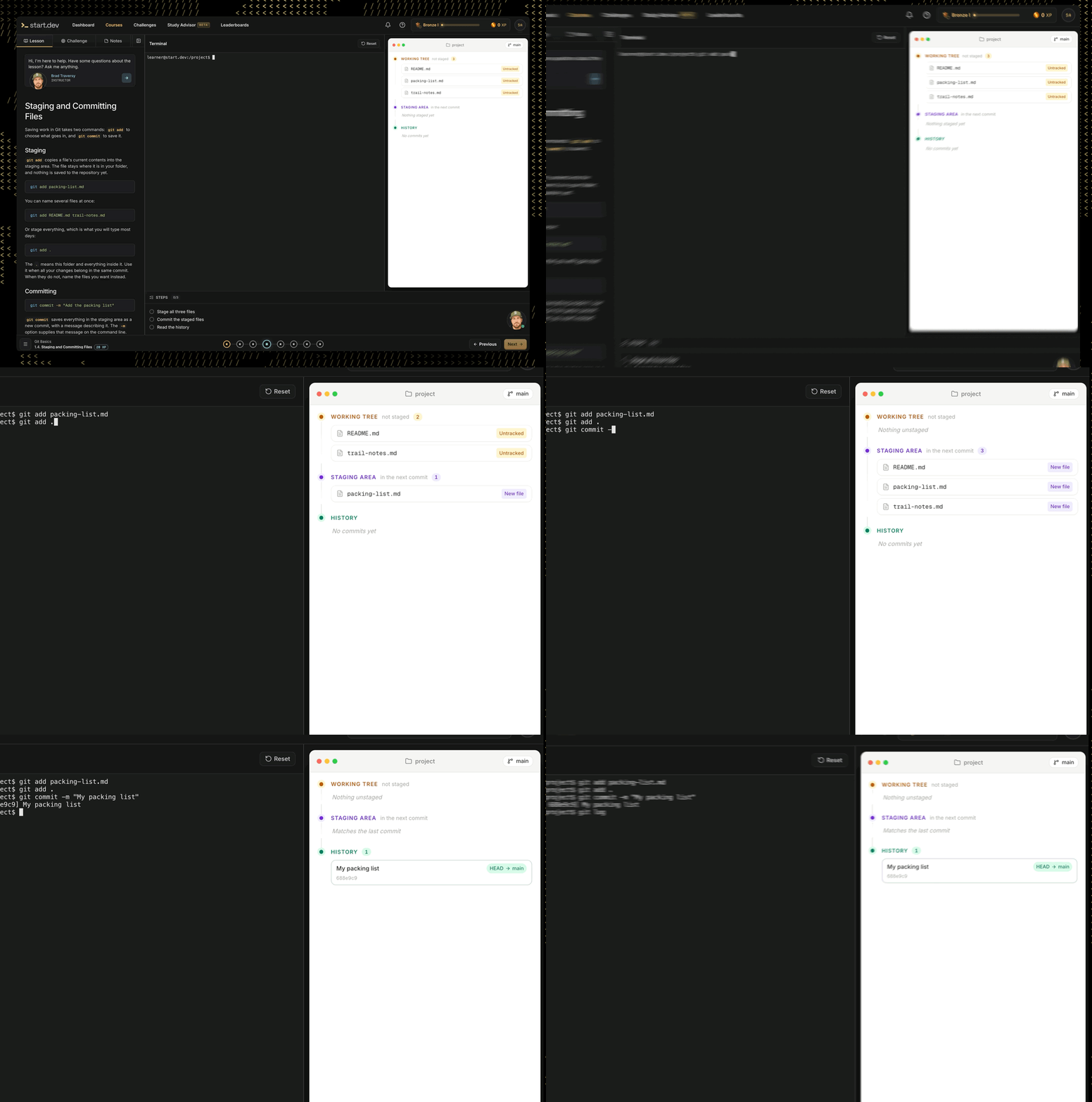
Run a Git command and watch the repo respond: the working tree, staging area and history update live next to your terminal.
Then there are the challenges: 110 of them, grouped into focused sets of six covering JavaScript, TypeScript, Python, React, SQL, HTML and CSS and more. Each set is labelled beginner to advanced, takes roughly an hour, and earns XP. You never run out of things to practice, and you can pick exactly the skill that feels shaky.

Challenges across languages and stacks, each with XP and a difficulty level.
That matters, because you learn to write code for yourself by solving problems nobody has walked you through. Boot.dev is hands-on too, but a library you can mix and match around your own weak spots is a different kind of freedom.
AI at every step, not in a side window
Boot.dev's AI mentor is Boots, a Socratic helper that often answers your question with another question. It's a good idea, and plenty of learners like it.
Stuart works differently: he's everywhere you are. The assistant built into the lesson workspace reads your actual files, tests and output, so the help is about your code, not a generic snippet. It explains the why behind a fix instead of handing you a line to paste, with no second tab and no copying context back and forth. Ask in a lesson, in a challenge, or when the tests fail.

Lesson, editor, tests and live preview in one view, with Stuart one click away.
One learner said the assistant gives "just enough information to get you to do the thinking." That's the whole job. And what you learn along the way can go straight into your notes, so your questions and answers become a study guide you'll actually find again.
The Study Advisor: the part you won't find on Boot.dev
Most platforms stop at the lesson. Start.dev adds a Study Advisor, a tutor for the whole journey rather than a single exercise. You can ask the things every learner wonders and nobody answers well:
- What should I study next?
- What challenges should I take?
- Where can I improve?
Stuart checks your learning progress and answers from what you've actually done, remembering where you got stuck and where things didn't land. If array methods keep tripping you up, the advisor points you back at the exact lessons and challenges that fix it, instead of nudging you onward and hoping. We couldn't find anything like it on Boot.dev's site, and a personal study plan that learns from your mistakes is what you'd normally pay a human tutor for.
Side by side
| Start.dev | Boot.dev | |
|---|---|---|
| Focus | The whole stack: front end, back end, data and AI | Backend, DevOps and data analysis |
| Practice | 110 challenges in sets of six, plus lessons, knowledge checks and projects | Coding exercises in every lesson, plus a Training Grounds and Playground |
| AI help | In-lesson assistant that sees your code, tests and output | Boots, a Socratic AI mentor |
| Knows where you're stuck | Study Advisor tracks your progress and tells you what to review next | No equivalent we could find |
| Free tier | Interactive in the first few chapters of every course, free to read and watch beyond that, plus monthly challenges, Study Advisor chats and AI messages | Interactive in the first few chapters of each course, then read-only |
| Gamification | Points, levels, ranks, badges and a verifiable certificate | XP, leaderboards and a game-like curriculum |
| Languages and topics | HTML, CSS, JavaScript, TypeScript, Python, SQL, Node, React, Next.js, Vue, Git and more | Python, Go, JavaScript, TypeScript, SQL, Linux, Docker, Kubernetes and more |
| Coming soon | Docker, Kubernetes, Node.js, NestJS, GraphQL, Django, FastAPI, Angular, Go and more | A curriculum roadmap on their site |
Catalogs and pricing change often, so check each site for what's included today.
Where Boot.dev has the edge today
We said we'd be honest. If you want Go, Docker, Kubernetes, Linux, RabbitMQ, cryptography or data structures and algorithms as full courses, or a dedicated DevOps or Data Analyst path, Boot.dev has them and we don't yet.
The key word is yet. Docker Basics and Kubernetes Fundamentals already sit on our homepage with a "coming soon" tag, next to Node.js Basics, NestJS, GraphQL, Django, FastAPI and Angular. Go for Beginners is on our public roadmap, which anyone can open without signing in, along with learning paths and projects.
The roadmap also heads somewhere we couldn't find in Boot.dev's catalog: a dedicated AI path. Learn Vercel AI SDK (opens in a new tab) is already here, and Prompt Engineering, MCP Servers and building agents are on the way. So if a Boot.dev course caught your eye, check what's coming before you switch platforms. For everything else in a developer's first few years, we've got you covered today.
Who should pick which
Pick Start.dev if...
- You want to learn to code and aren't sure yet whether front end, back end or full stack is for you.
- You want to write code from the very first lesson, in your browser, with nothing to set up.
- You like having challenges to pick from whenever a topic feels shaky, and AI help plus a study advisor that notices where you're struggling.
- You value learning from top coding instructors who have taught millions of students and spent 10+ years teaching by doing.
Pick Boot.dev if...
- You've already decided on a backend or DevOps career built on Go, Docker and Kubernetes, and want those courses today rather than waiting for them to land here.
- You want a heavily gamified, RPG-style curriculum with a big guild community around it.
- You value a more established learning platform that has been in the industry for several years.
Our recommendation
Pick one place, go deep, and write code every day. We think the best place to do that is Start.dev: a full-stack catalog, a pile of challenges, AI at every step, a study advisor that keeps weak spots from piling up, and a roadmap that keeps growing. The free plan is enough to find out for yourself. Start with Python for Beginners (opens in a new tab) for a gentle first language, or JavaScript Basics (opens in a new tab) to build for the web right away.